

This project required knowledge about:
Here I added preprocessor functionality, added a new classification algorithm (based on frequent words), and added the ability to support n-fold cross-validation.
This project required knowledge about:
Here I wrote programs that compressed and decompressed files using Huffman codes. The compressor was a command-line utility that encoded any file into a compressed version with a .huf extension. The decompressor was a web server that let you directly browse compressed files, decoding them on-the-fly as they were being sent to your web browser.
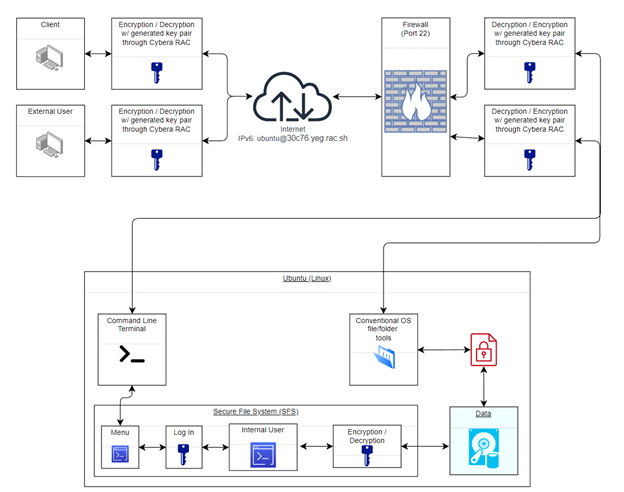
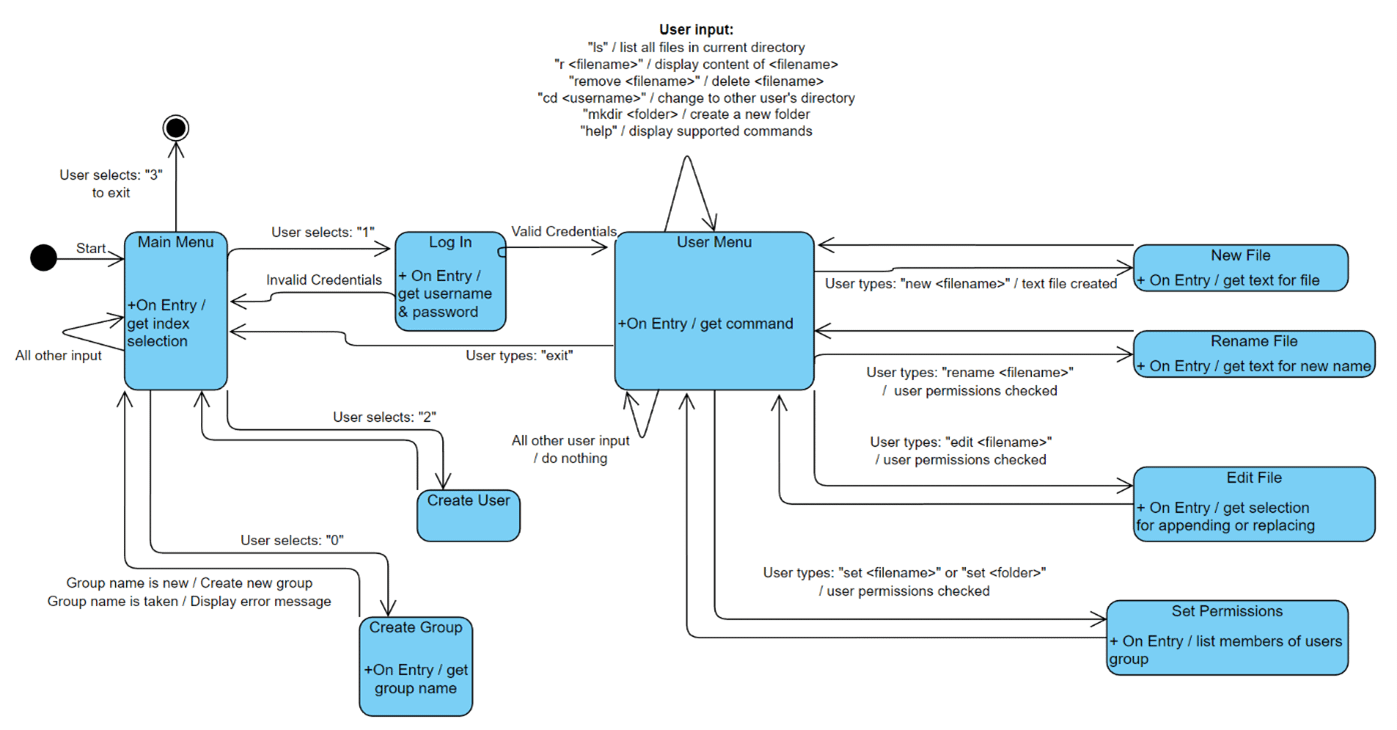
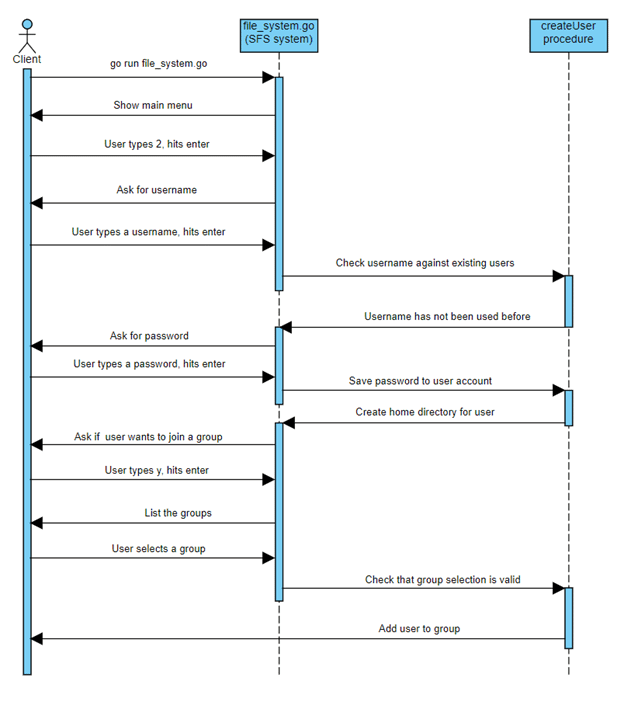
The objective of this project was to design and implement a secure file system (SFS). The SFS system manages a set of users, allowing them to create and store data on an untrusted file server. The untrusted file server for this project will be the Linux operating system which will be hosting and running our SFS system code. The user of the Linux OS (Ubuntu) will be considered an external user and will not be considered a member of the SFS system. Users created by using the SFS system menu and logging in will be considered internal users. External users will be able to see the internal user’s files and directories, by using the Ubuntu file and directory tools, but the files and their contents will appear encrypted to maintain confidentiality. If an external user should modify any of the internal user’s data, the SFS system will detect this change and immediately notify that internal user the next time they log in. Internal user’s will be able to share files with each other by joining the same group.
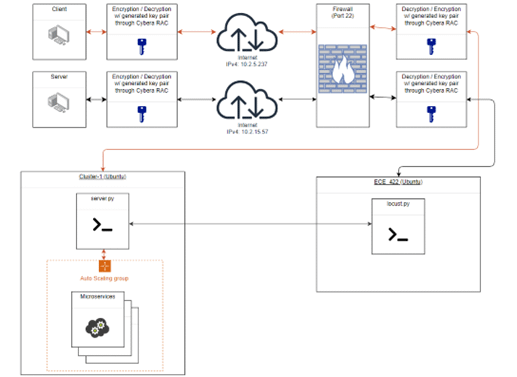
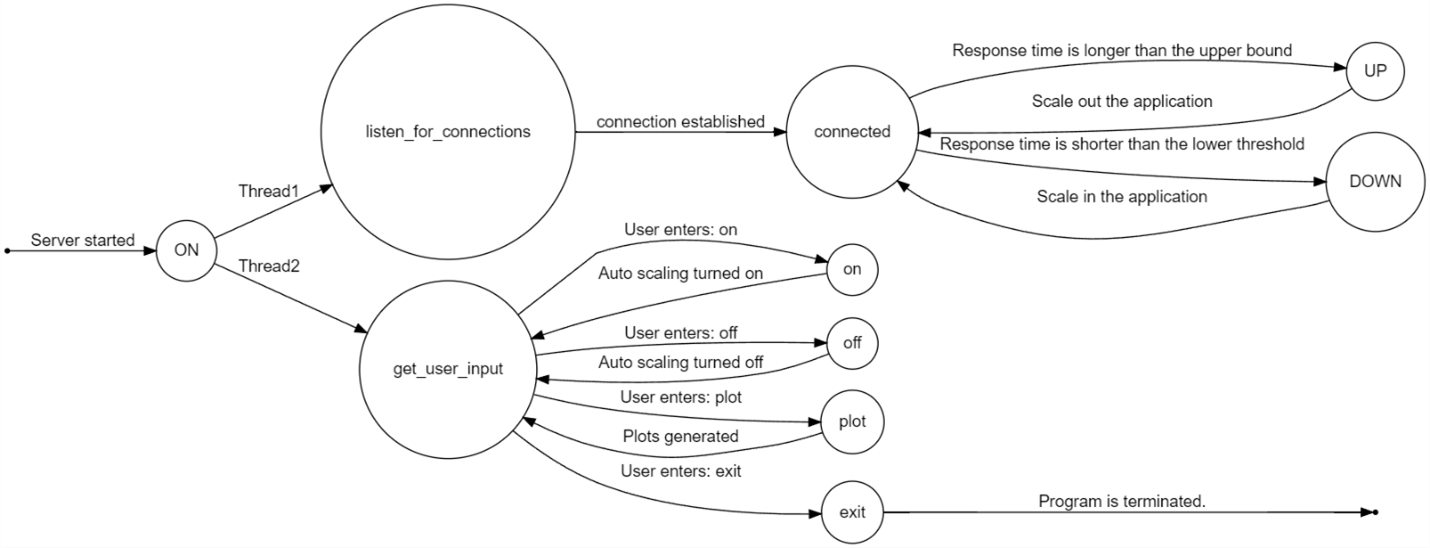
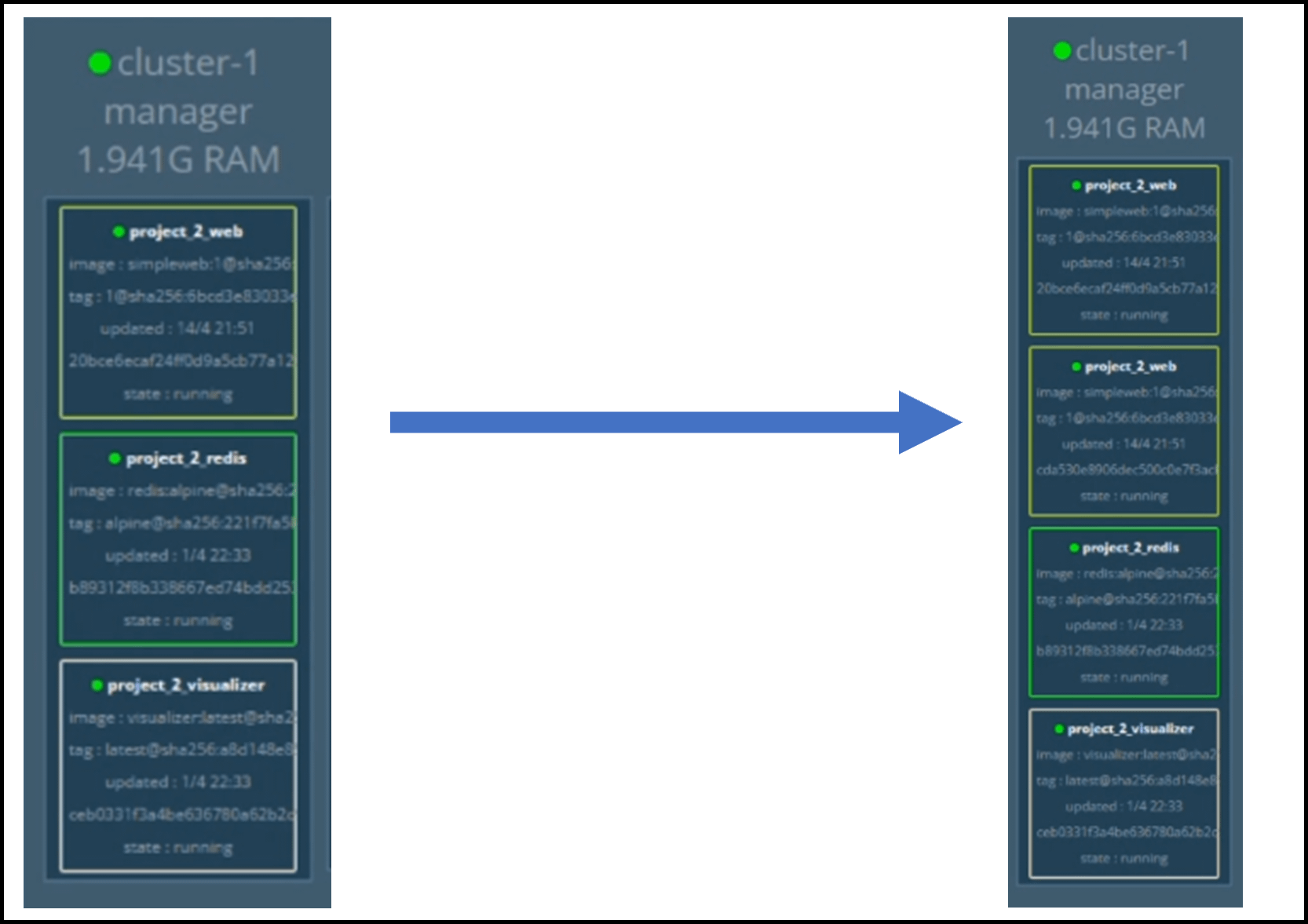
The objective of this project was to design and implement a reactive auto-scaling engine for a cloud microservice application (ASCM). A reactive auto-scaling engine is a system that automatically adjusts the number of instances of a microservice based on the current workload and resource utilization. It constantly monitors the application’s performance metrics such as CPU utilization, memory usage, network traffic, and response time to identify any spikes in demand. When the engine detects an increase in demand or a decrease in available resources, it triggers the auto-scaling process. The engine then provisions new instances of the microservice to handle the increased workload, and once the workload decreases, it can also terminate the additional instances to avoid unnecessary costs. The result is a self-adaptive application that optimizes both performance and cost at the same time. To test the application, a bell curve shaped (Gaussian distribution) workload will be applied to evaluate the system’s effectiveness.

This project required knowledge about:
For this project I implemented a navigation system (like Google Maps) that allowed the user to scroll around on a map, e.g., the map of Edmonton, to select start and end points of a trip. The trip information, which included coordinates of these points, was sent to a central route-finding server. This server computed the shortest path between the selected two points (or nearest points to them in the road network), and returned to me the route information, which was coordinates of the waypoints along the shortest path. I displayed the route as line segments overlaid on the original map by passing the waypoints to a plotting application that also ran on my client side.
The navigation system could be viewed as a client/server application where a client and a server, which may have run on the same machine or different machines, communicated with each other using a pair of sockets to solve a complex problem that could not be easily solved by me alone.
In this project, two independent programs ran on my client side: A plotter program that displayed the map and allowed me to use the mouse or keyboard to zoom and scroll around on a map of Edmonton to select the start and end points of a trip. A C++ program that obtained this data from the plotter and communicated with the route finding server using sockets. Specifically, it sent the trip information to the server and consequently received the route information. It then passed the route information over to the plotter application so that I could draw the route on the map.
The server was a single C++ program that ran the graph search algorithm on a road network (i.e., a directed graph) upon receiving the trip information from me. It then sent the waypoints along the route, which are nodes on the shortest path, from the trip’s start point to its end point (i.e., the path information) to me. I could then repeatedly query new points via my client to receive new routes.

This project required knowledge about:
Shell programs like Bourne shell (sh), C shell (csh), Bash, and Korn shell (ksh) provide powerful interactive programming environments that allow users to utilize many of the services provided by complex multiprocessing operating systems. For this project I wrote a simple shell program that would respond to a set of user commands and perform the corresponding system function.
Commands:
This project required knowledge about:
In recent years, many information technology companies have increased their reliance on data centers to provide the needed computational and communication services. A data center typically houses hundreds to tens of thousands hosts. Each host (also called a blade) includes CPU, memory, and disk storage. The blades are often stacked in racks with each rack holding 20 to 40 blades. At the top of each rack, there is a packet switch, referred to as the Top of Rack (TOR) switch, that interconnects the blades in the rack with each other, and provides connectivity with other blades in the data center and the Internet. In this project, we consider a simplified hypothetical data center network where the TOR switches are connected to a special device, called a master switch. The architecture of the network uses a new network design paradigm, called software-defined networking where the TOR switches are assumed to be simple, fast, and inexpensive devices. The master switch collects and processes information that enable it to give routing information to the TOR switches. During network operation, each packet switch receives data packets from either the blades in its rack (an input data file is used to specify such packets), or its neighbouring switches connected to ports 1 and 2 (if any exists). Each packet switch is a simple device that stores a forwarding table. Initially (when a switch is rebooted), the forwarding table stores an initial rule. Subsequently, when a packet header arrives to the switch, the switch tries to find a matching rule in its forwarding table. If no match exists, the switch asks the master switch for a rule to add to the forwarding table and apply to the packet. Assume that the forwarding table in each switch is large enough to hold rules for processing at most 100 arriving packet headers.
The project deals with a simplified network that includes the following devices.
The master switch is responsible for issuing rules to packet switches so as to enable successful routing of packets.
The software implemented the transactions performed by the simnple network. The program could be invoked to simulate a master switch or to simulate a TOR packet switch.
A branch off the original program was created to then implement TCP socket communication. In this version the packet switches communicate with the master switch over TCP sockets and the program can now be invoked as a TCP server (simulating a master switch), or a TCP client (simulating a packet switch).
New Features were:
This project required knowledge about:
The program simulates concurrent execution of jobs using pthreads. The jobs require different types of non-sharable non-preemptable resources, which are specified in an input file. The program uses a basic deadlock prevention scheme to prevent deadlocks and aims to achieve good concurrency among the threads. A monitor thread prints the state of each job thread periodically. The program outputs information on resource types, jobs, and running time.
Concepts:
Concurrent execution: the execution of multiple tasks or processes at the same time.
Pthreads: a POSIX standard for threads in C/C++ programming language.
Non-sharable non-preemptable resources: resources that cannot be shared between threads and cannot be interrupted by other threads.
Input file: a file that contains data or information that is used as input for a program.
Monitor thread: a thread that monitors other threads and reports their status or progress.
Deadlock prevention scheme: a method or algorithm used to prevent deadlocks in concurrent systems.
Concurrency: the ability of multiple tasks or processes to run simultaneously.
Running time: the amount of time it takes for a program to execute.

This project required knowledge about:
The band, is planning their first album release.
The band is looking for a unique name, an adjective followed by a noun.
Equipment management
Music management

These projects required knowledge about:
In this program, we wrote assembly language code and used the thumb2 instruction set. The CPU only understands machine language (binary), The Nucleo-L432kc Arm processor is used to run the machine code using the STM software. Assembly language is machine level code that tells the processor to carry out its operations. We wrote an assembly language program that converted an ASCII character to its hex/dec equivalent, and then also converted an ASCII character to its upper- or lower-case equivalent. We used registers to get the data (ASCII character) stored in the memory to the memory location where the converted value is stored, and the conversion being done in the registers. Specifically, we used the load register (LDR) and store register (STR) to do this. In which, the load register fetched data from memory into the register and the store register stored data from the register into memory. To read from memory we used Register 2 and to write to memory we used Register 3. We then used Register indirect to point to the registers of memory read and memory write, storing the data into the register that is pointing at the operands.
The purpose of this program was to get familiar with the different addressing modes. The program would analyze two different data points from two memory locations and from that determine the area underneath the curve using trapezoidal rule. We did the addition of two arrays using the Register Indirect with Offset, Indexed Register Indirect method and the Post-increment Register Indirect. The addition of the contents of the two arrays was stored at a specific memory location given in the operational code. We calculated the area underneath a curve using the Trapezoidal rule. The X and Y data points of the curve are stored as arrays. Since the multiplication instruction could not be used, the multiplication was performed by using logical shift left.
In this program I wrote subroutines for a bubble sort algorithm program. Good subroutines are expected to be completely contained pieces of code with one entry point and one exit point. In addition, either the caller (the main program) or the callee (the subroutine) must preserve register values to ensure proper execution of code. The bubble sort algorithm is a simple algorithm that goes through a list again and again comparing adjacent elements, swapping them if they are in the wrong order. It will go through the list of elements or numbers repeatedly until the there is no need to swap and the numbers are sorted. The stack was used with the operations PUSH and POP, allowing for data storage and retrieval. PUSH allows to store the data into the stack structure while POP retrieves the data that was last stored onto the stack.
In this program I had to code a subroutine called WelcomePrompt that prompts the user to enter a keystroke from the keyboard. The keystroke entered by the user must be an upper case letter or number. If the condition is not met, the program will reprompt the user to enter a proper keystroke. The valid keystroke(longword) which is stored as its Ascii code will be passed out through the stack. Then I had to code a subroutine called convert which takes the keystroke from the stack and replaces it with the pattern address. Then I had to code a subroutine called Display that takes the pattern address from the stack and displays the pattern on the LED array by lighting up the proper LEDs.

These projects required knowledge about:
The program could operate in either a customer mode or an editor mode. The operating mode is determined by the login credentials used. Prior to logging in the program can add a new customer record, In the customer mode the program can begin and end a watch session, search movies, and begin and end watching a movie. In the editor mode the program can add a movie to the database and update movie recommendations. A summary of functions follows:
Login Screen: The user is prompted to enter either “L” or “S”
Customer Interface: The user is prompted to enter one of the following commands
Editor Interface: The editor is prompted to enter one of the following commands

These projects required knowledge about:
Welcome to Lavish Object Orientated Programmed software (LOOPs)!
LOOps was the project name for our meal-planning android app.
The purpose is to assist in meal planning, we want a mobile application that allows one to track their food storage, record their recipes, plan their meals for several days, and prepare shopping lists.
The app was developed by 6 students at the University of Alberta; Charles, Hengshuo, Jade, Jianxi, Pi, and Scott.
Congratulations on making it to the end, and thanks for taking the time to read (or scroll) through it all! Haha
I’m always looking for a new challenge, click the button below if you’ve got something!